In this post I’ll show how to enable auto-mount for encrypted volumes with the Western Digital MyCloud EX2 Ultra NAS. This is a very specific scenario but documenting it for myself and sharing with others as I saw misleading information on forum posts.
Context
A few months ago, I ran into issues with the volume on my Western Digital MyCloud EX2 NAS. After a long series of terminal commands and troubleshooting, I was able to re-enable encryption on my 2 drives, but it caused the auto-mount setting to be disabled. As a result, anytime my NAS rebooted (scheduled or after an update) I had to manually re-mount the encrypted volume.
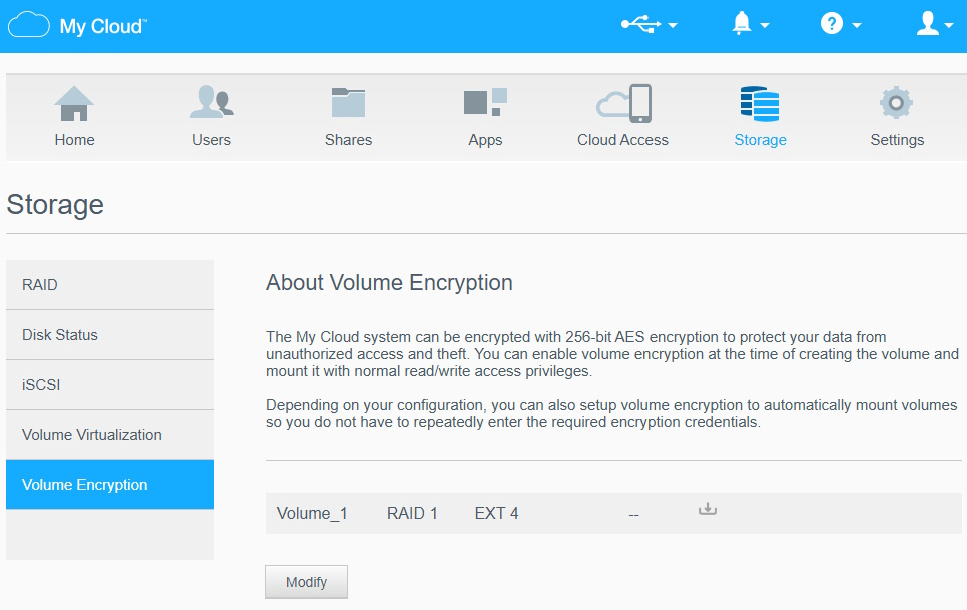
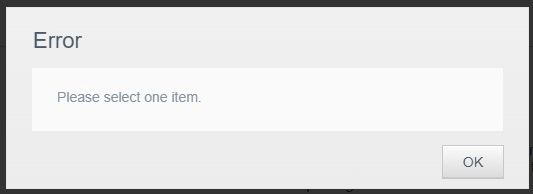
I looked online for where to update the auto-mount setting in the admin portal. On the Storage –> Volume Encryption tab, I clicked “Modify” but I ran into the same issue other users reported: “Error – Please select one item”.
Screenshot of WD MyCloud EX2 admin portal for Storage -> Volume Encryption
Error dialog for needing to select a volume to modify
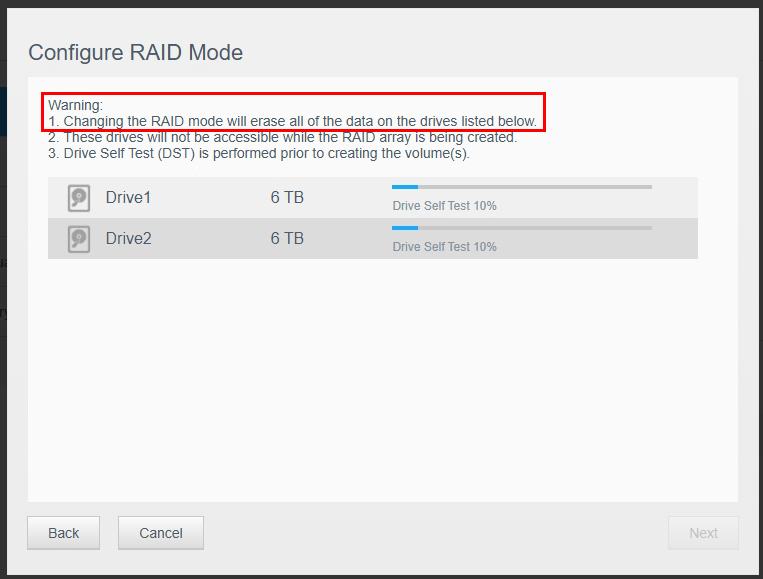
The guidance in a WD support forum (7 yrs old now, possibly updates make this no longer correct) was that you need to re-configure RAID mode for the drives. Doing so will erase all of the data on the drives (see warning below).
Configure RAID Mode screen showing warning about erasing data on drives
Solution
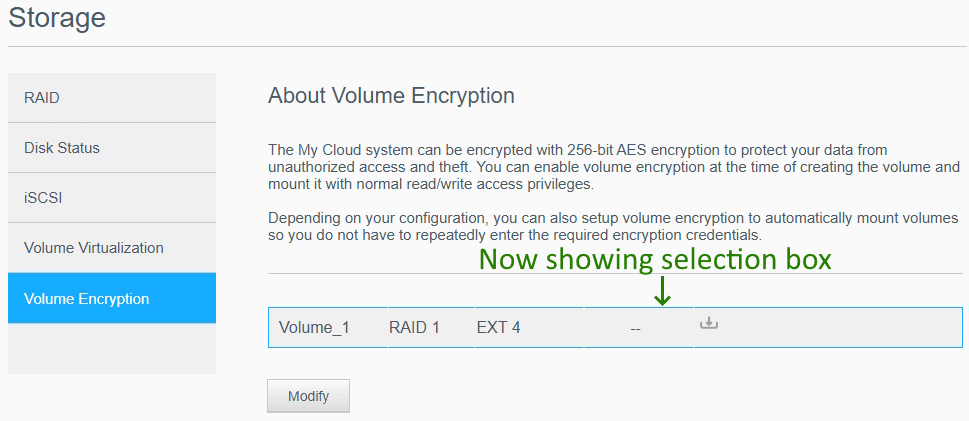
It turns out the solution is much easier and doesn’t require erasing all of the data on your drives. Back on the Volume Encryption tab, click the row of the volume (you’ll see a blue border for selection) before clicking Modify.
Screenshot showing selection of volume with blue border on volume
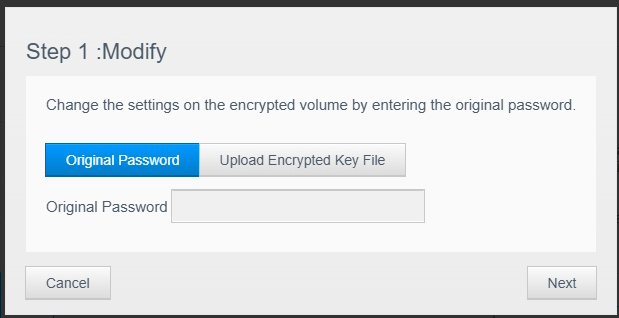
Then enter your password or select the encrypted key file.
Dialog box for entering encryption password or key file
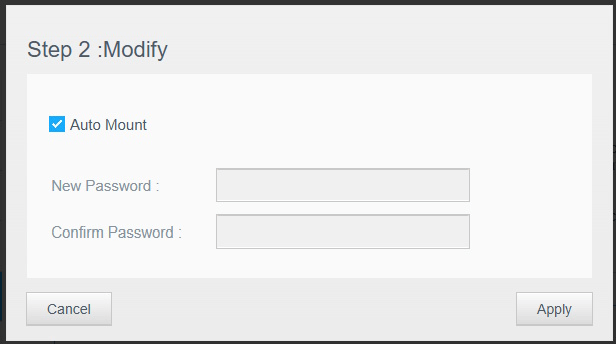
Finally, you will see the option to select “Auto Mount” and click Apply.
Dialog box with checkbox to enable Auto Mount
Now you should be all configured for auto-mounting the encrypted volume. Hopefully this information will help others that got stuck at the same incorrect guidance I originally ran into. Thankfully this information is available in another support article, but my original searches did not find this information, so linking to it from here.
I started this post halfway through 2026 and now finishing it up a few months later, but it is never too late to get started again. This is a tradition I’ve had for many years now of writing a retrospective (2024, 2023, 2022, 2021, 2020, 2016, 2015, 2013, 2012, 2011, 2010) or look ahead (2019, 2014, 2013, 2012, 2011, 2010). In this post I’ll review some of the big goals and accomplishments that I had through 2025.
Milestones
Looking back at my 2024 retrospective, I had a number of big goals that I was planning ahead for 2025. I’m happy to say that I completed a number of those goals.
Half marathon
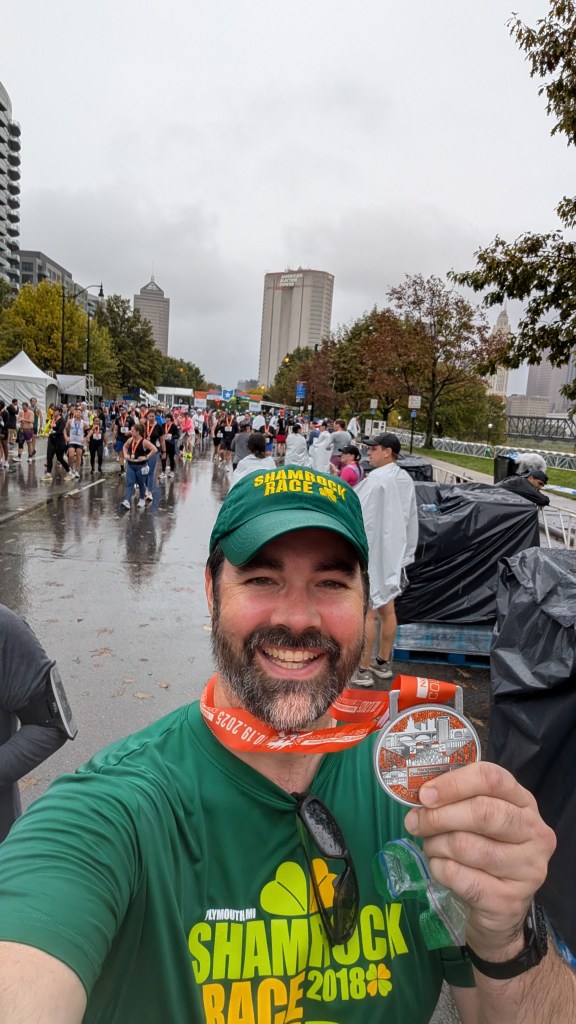
A little story on this one first. I recently told a friend that I completed my first half marathon in 2025. They said “ohh, you must really like running” to which I replied “no.” Then why did you do it? That gets to the heart of the matter. Why did I subject myself to almost a full year of training, weekly runs of 4-10 miles, cold / hot weather, and push my body well beyond anything I had ever done before?
The answer to that goes back many years. When I was born, I had a condition called hip dysplasia. Essentially the “ball” part of my right leg bone wasn’t fully in the hip “socket”. Doctors test for this but somehow mine wasn’t fully diagnosed or corrected. Over time the hip portion under-developed so that the joint floats more than the ball being properly in the curved socket. When I finally diagnosed this in my teen years (after it started hurting regularly with sports) the doctor told me I’d need a hip replacement by the time I was 40 and likely need other assistance later in life. Other than that, keep exercising and stop when something hurts too much.
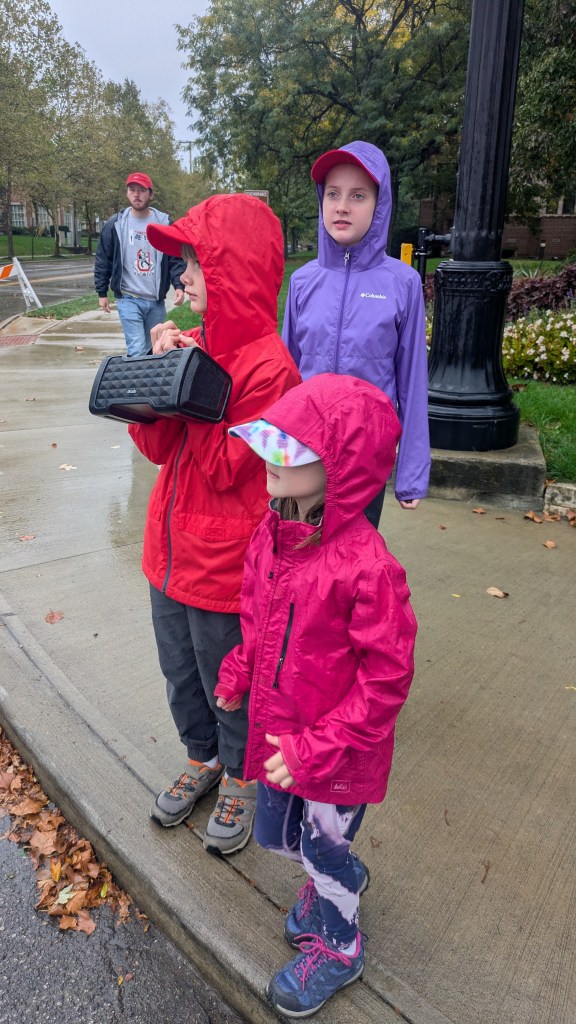
Since that time, I’ve followed the latter part to keep pushing myself until it hurts. Originally it started out with running 1 mile, then signing up for my first 5k over 10 years ago, then moving to quarter marathon / 10k, and finally last year with a half marathon. It definitely pushed me more than I had ever thought I could go, but that was the point. My training plan, nutrition changes, and support from other runners really helped. Huge thanks also to my wife and kids who braved the bad weather to cheer me on at 3 different spots on the course. I’m so thankful to have completed (despite the terrible weather and conditions)!
I don’t plan to sign up for another half marathon given the amount of time it takes in training and away from family, but I have already completed another 5k, quarter marathon, and 10k in 2026 so far. Perhaps in the future when kids are older I would explore this again.
Reading
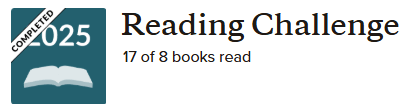
In 2025, I read 17 books with a goal of 8. A few standout books:
With 3 kids who are growing up in the digital age this was a very timely read. I appreciate how the author writes about not just what you try to limit with young kids, but also the timing with their developmental growth. There are certain points in development when negative influences will have an increased impact. Highly recommend.
John Cleese is a very funny person and reading this book I could hear his voice in my head as I read it. It is a very short book with not many novel ideas, but it is very succinctly written and worth reading.
As my wife and I are hitting “middle age” and our parents are getting older, this was a good reflection on how we spend our money, what we deem as important, and planning for later stages in life. The goal is not that you should spend / give away all of your money to the point of running out, but be thoughtful in when and how you want to save / spend so that you are able to enjoy experiences, etc.
I enjoyed this trio of books for the scientific walkthroughs, the outlandish scenarios, and also sharing reading with my kids who laughed greatly at a few of these.
Work and pace of life
This is a challenging area for me. Within the last ~2.5 years, my role at work has shifted towards AI (first on the extensibility side and now into core platform). With that shift, the pace of work and expectations have risen dramatically.
Years ago, what used to be a cycle of big moment releases (2-3) throughout the calendar year morphed into more of a release early and often (usually on the order of 2-4 weeks) approach. This means that there are rarely “downtimes” throughout the year to step back, assess how things went, and plan what is coming next. Not to say that one is better than the other, but the continual fast pace can lead to burn out. I’ve noticed this in myself and (even here in 2026) am processing how to adapt and take time for self-care.
Diaconate formation
As a follow-up to my 2024 retrospective, I am still in the Inquirer phase for the diaconate. I’ve completed all of my courses so far and now awaiting the next opening for Aspirancy phase in 2027. I’m still discussing timing with my family and spiritual director. If / when accepted in, this would begin a 5 yr process of discernment, classes, and formation. Currently I’m leaning towards holding off until the next cycle (2 yrs later in 2029) but we shall see what God holds for this.
Conclusion
There are many other active things going on (den leader for Cub Scouts, volunteering at church, trips with family, learning Spanish, etc.), but this is a brief overview. The important thing in writing this down has been good to get back into the habit of sharing more. Some of that is related to work / family demands on time, but I do want to take more time to get active in community (online and in-person) again. What are your goals for the current / next year?
[Update 2025-07-09] After internal discussion with Merill Fernando and others, it does appear that you can use delegated authenticated with interactive auth prompt. I will be testing this out soon and share more once testing is complete. [/Update]
Recently I had the chance to test out a number of new technologies as part of my org’s Fix Hack Learn (FHL) week. This includes an MCP (model context protocol) server for Microsoft Graph to ingest public data into a Copilot connector using GitHub Copilot agent mode. While I’ve had lots of experience with Microsoft Graph and Copilot connectors (formerly Graph connectors), the other areas were new to me. In this post I’ll walk through my experience and observations based on my time spent so far.
In general, I was pleasantly pleased with how easy it was to get started. It literally took 5-10 mins starting from nothing to having my first successful prompt successfully responding from the MCP server. The following days I dug in really deep and got a bit lost trying out different models, adding instruction files, and testing out various prompts. By the end of the week, I had a working process that you can see in this shortened video.
Use case
To frame the scenario, my goal was to identify a set of publicly available data (ex. data.gov) and ingest that into M365 Copilot via a Copilot connector without writing any code. Once the data is ingested I could then use M365 Copilot to reason over the data through user prompts.
In my reading thus far, MCP is generally used as a way to expose “tools” to an LLM so that the LLM can identify APIs or other resources to use when processing a user prompt. In my case though I was essentially treating MCP as a means to prototype a development artifact (i.e. Microsoft Graph requests that worked with users, Copilot connectors, SharePoint sites, etc.) Think of this like a developer REPL akin to Microsoft Graph Explorer but instead of calling APIs directly I used natural language prompts as the input.
Getting started
This post is not intended to be an introduction to MCP, but for those interested I found the following resources useful.
From the Microsoft Graph perspective, there is not an official Microsoft Graph MCP server, but I did find a community-based MCP server called https://lokka.dev from my peer Merill Fernando. You can run Lokka locally which I did as an NPM package in VS Code (now natively supported) as well as other options.
Merill provided a quick and easy guide for installation and running the Lokka MCP server. A few of the set up instructions didn’t match the UI screens as this is recently GA’d and subject to change, but I shared with Merill and he was able to update as of the time of writing.
Ensure that you have the pre-requisites installed. In my environment that includes (may be higher than stated pre-reqs):
Node v22.16.0
VSCode v1.101.2 (user setup)
Lastly, ensure that you have created and consented permissions on a Microsoft Entra application registration. Note that at this time, as far as I’m aware, this currently only supports application (i.e. app-only) permissions. There are some workarounds I’ve read about to implement delegated permissions, but it doesn’t appear to be formally supported or part of the MCP spec as of yet. I was originally led to believe that only application permissions are supported (which is what my sample used), but after internal discussion I’m told that delegated auth is now available although not widely adopted by many MCP servers yet. I will be testing delegated auth over the coming week or two and share a separate update.
I purposely only consented the following permissions so that I could test out scenarios that weren’t consented:
User.ReadWrite.All
ExternalConnection.ReadWrite.OwnedBy
ExternalItem.ReadWrite.OwnedBy
Comparing LLM Models
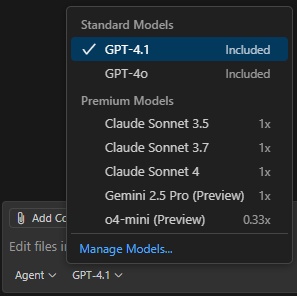
One thing that was not clear to me at first was that GitHub Copilot agent mode supports different LLMs, but more importantly that some of those models are considered “premium” models and have different consumption / usage limits. Additionally, some models (ex. Claude Sonnet 3.7) are only accessible with a paid plan such as Copilot Pro or similar.
Ex. screenshot of differing consumption rates depending on model used:
Testing out commands / models
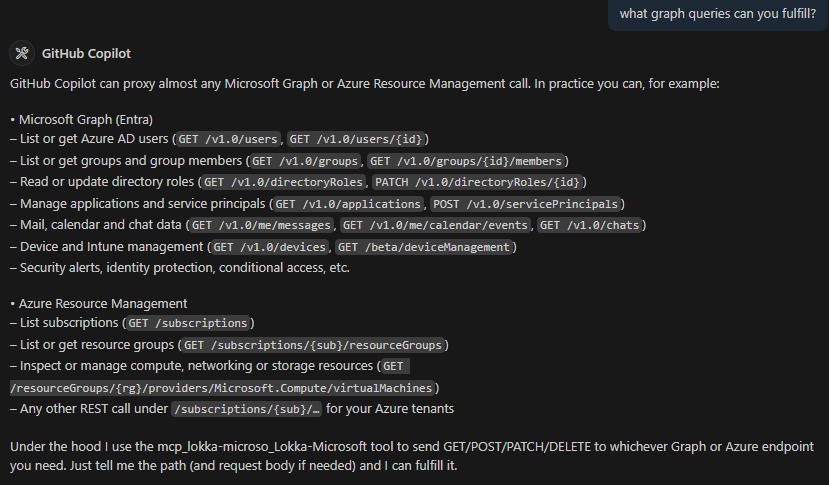
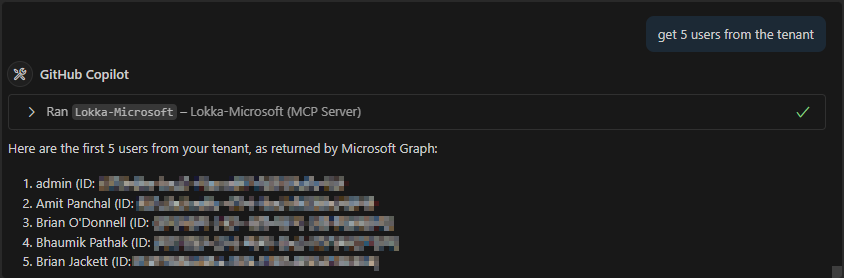
I attempted a number of simple scenarios such as getting users from the tenant, filtering on user properties, and updating metadata on a user. All of these were successful with varying formats of output depending on the model used.
GPT-4.1 was my preferred model, primarily because it struck a good balance between figuring things out on its own, good formatting, and prompting me as the developer before proceeding with various creative / destructive actions.
Claude Sonnet 3.7 attempted a number of actions on its own without asking me for input and in many cases those has undesired effects. This was the “magic” that I referred to in a previous LinkedIn post. In just 2 testing prompts, I had created a Copilot connector, registered a schema, and ingested sample items. Sadly the schema and sample items were very far off from what was intended and thus this soured my experience.
o4-mini on the other hand was very sparse on information that it returned and I perceived it to be much slower (i.e. time to first token in response was at least 50-100% slower than the others).
GPT o4-mini (preview)
Claude Sonnet 3.7
GPT-4.1 [my preferred so far]
I ran a number of other scenarios as well that are too lengthy to share here, but these include:
Creating a Copilot connector (see video near top for overview)
Scraping information from website pages
Using instruction files (for GitHub Copilot agent mode) to encourage / discourage prompting developer for confirmation of actions
Attempting to access resources not granted permissions to
ex. assign job title, department, email address, etc.
Conclusion
I am very happy with my time and outcomes testing out MCP + Graph + VS Code, but realize that this is not a production-worthy solution yet. First among them is only supporting application permissions, many of which require global admin consent. There are still big gaps when it comes to fully supporting delegated OAuth, fine-tuning the right amount of control vs. creativeness of the models, and rough edges getting a scenario implemented. I see lots of potential and will continue to keep an eye on this space.
If you have any questions or suggestions for additional use cases, or are already using MCP in your solutions, please share in the comments below.
Disclaimer: Yes, I know it is already 3+ months into 2025 as I write this. I’ve put off writing in general for too long, but it’s never too late to start back up again.
Milestone
Last year I turned 40. It feels odd to say that in general, but looking back over the last ~2 years it has been a time of big change personally, professionally, and with my family. I recently commented on a Bluesky post from a random user who mentioned they were also turning 40.
Going from 39 to 40 was a much bigger "reflection -> take action" point in my life than I would have imagined. I had a list of really big "someday I'd like to…" items that I started consciously working on and now I'm actively pushing forward with in my life.Make time for yourself.
When I was 39 and looking ahead to 40, there were a number of big things that I wanted to do in the coming 5+ years. I think that arbitrary age of “turning 40” was a good motivational kick to get started on those goals. Already I’ve started:
Learning Spanish (again) – 755 day streak on Duolingo
Training for half marathon race
Started Diaconate pre-req classes and formation discussions
Applied and accepted into management position for my team at work
If you are looking at big, audacious goals in your life, what concrete steps are you taking to achieve them and on what timeline?
Exercise
As mentioned above, one of my goals is to complete a half marathon race. In 2023-2024 I increased my walking routine on my home office treadmill, getting up to 12 miles per week (4 days a week of ~3 miles). Now that we’re into 2025 I’ve also registered for a 5k (completed in March), 10k (2 months away in June), and half marathon (Oct 2025).
A big thank you to a number of friends who have shared training plans, nutrition advice, and encouragement for my half marathon training. I’m also incorporating other strength and core workouts to help prepare. Looking forward to crossing that finish line in 6 months!
Reading
Since 2021 I have been reading books more regularly. You can view my profile on GoodReads along with “read” and “want to read” lists. I set my 2024 GoodReads challenge to read 8 books and ended at reading 9. A few were last minute short reads at the end of the year, but still made it. One thing I did notice is that I had gotten very heavy into religious books (for classes and related) but found that I enjoyed mixing up into other topics. Going forward I’m trying spread out topics so that I keep up interest in reading more regularly.
My 3 children are starting to grow into adolescence / pre-teen. My wife and I have had conversations about making the most of our time with our children while they are still young and making memories. I appreciate how this book gives simple advice for “being present” with family members. It is not about what you buy them, lavish trips / vacations, or even the words that you say to them. It is about simply showing up and creating an environment where children feel safe and encouraged. I would recommend this to parents / caregivers, but primarily with younger children if possible.
As a Catholic / Christian, I’ve heard the story of the Prodigal Son dozens of times for decades. I read this book as part of a men’s group at my church. I was fascinated with how the author dissected various aspects of this painting, applied them to different perspectives of the characters in the story, and related it to his own personal life and journey. Even if you are not practicing a faith, highly recommend reading for reflection.
Many of us can likely relate to feeling overwhelmed, not getting enough rest, and constantly playing catch up after you do “rest”. I enjoyed the ways this author outlined building rest into your daily / weekly / annual life, how to use rest time more effectively, and setting expectations around self-care. You can’t perform at your best if you are constantly fatigued. Personally I’ve struggled with this (borderline burnout) in the past year+, so this is definitely an area I need to work more on.
For my 2025 GoodReads challenge I’ve set a goal to read 8 books again and already making progress.
Diaconate formation
As mentioned in my 2023 retrospective, I’ve begun pre-requisite classes to become a deacon within the Catholic Church. I have completed 5 requirements and only have 1 remaining. I’m already starting to read the book for the next class so that I don’t get overwhelmed with class work in addition to work / family life. I’ve also been helped by meeting every other month with a spiritual director (priest from my hometown) to discuss life, faith, and my future endeavors.
Work & management role
In early 2024, I applied for and was accepted to take a management position for my current team (M365 Copilot Extensibility CPx). I had been discussing with my then manager about moving into a management role. I had been interested to take a small step back from the technical focus of my role and instead grow in guiding the careers of my teammates. It has been just over a year since I took on this role and it has been very rewarding so far. I can’t say if this will be my continued path forever, but I look to continue pushing myself and others to be the best that we can.
One aspect that has been a challenge in the last year is the pace of work life combined with my children growing older and being active in more activities. As I tell some of my peers, the AI boom has been “gas pedal to the floor for 12-18 months” and not let up much. In the past we used to have cycles of intense pushes and then lulls to build up for the next push. With our AI advancements, most of those former lulls are now additional mini-marketing moments, pivots to more promising focus areas, or similar. I truly treasure the time off that I take for family vacations or other needs. It is important to “touch ground” so that I can recharge my own personal batteries.
Learning Spanish
One interesting side item is that I started to (re-)learn Spanish. In grade school and high school when I took 5 years of Spanish classes. I signed our family up for Duolingo (everyone now learning at least 1 language / music / mathematics) as well as try to find time to practice with others from my church (large Hispanic population) or peers at work. I’m on a 760-day streak so far and enjoying this very much. If you’d like to practice together sometimes reach out and let me know.
Conclusion
2024 (and now part of 2025) feels like it has flown by. Reflecting on what I wanted to accomplish has truly been helpful in making intentional choices on how I spend my time, deciding what I say no to (to make time for the things I say yes to), and setting up longer term plans. I hope 2024 treated you well and that you are making progress on your own goals. Feel free to share any of your experiences in the comments or link to your own reflection from 2024.
In September 2024 I joined Dona Sarkar on the Copilot Learning Hub video series to discuss M365 Copilot extensibility via declarative agents, Graph connectors, and more. Great opportunity to share out more about how customers and partners can extend Microsoft 365 Copilot with additional knowledge, custom actions, and more!
In this post, we’ll walk through a scenario for surfacing Microsoft Graph connector items via the Search APIs on Microsoft Graph and then using values in the response to retrieve the full content of item using the Graph connector APIs on Microsoft Graph.
Scenario
This week, a customer asked the following question:
“Once we index files using Graph connectors, how can we retrieve the full content of those items to be used in additional experiences like a custom search solution for our employees? The Search APIs (on Microsoft Graph) appear to only retrieve a snippet of the matching results.”
As the customer noticed, when you use the Microsoft Search API to search Microsoft Graph connectors, you can list which fields (properties from Graph connector defined schema) to return, but you can’t return the full content that was ingested. This is by design as search is intended to retrieve snippets of results for displaying in a custom search experience, for example.
Solution
Let’s look at querying for Graph connector items using the /search/query endpoint (documentation):
Note: replace “ServiceNowKB1” with the id of your connection.
Notice the “substrateContentDomainId” value in response. You can parse the value and take the substring after the comma (,) such as highlighted above. This is the itemId of the Graph connector item.
Next, query the Graph connector ingestion API (documentation) on Microsoft Graph for the items in the Graph connector (externalConnection). Again, replace “ServiceNowKB1” with the connection id as well as replacing the itemId.
With the ingestion API we are now able to retrieve the full content of the ingested item. Note that this is for a single item at a time. If you have multiple items, you will need to iterate through them.
Conclusion
Graph connectors power discovery of non-Microsoft 365 data in multiple native Microsoft 365 experiences. If you have a need to display Graph connector items in an alternate location (line of business application, custom search portal, etc.) hopefully you found this post helpful. Feel free to leave comments or questions if you have additional needs.